SmarterStrike
Options Execution & Lifecycle Automation

The operational layer between trade intent and controlled options execution.

As trading becomes increasingly AI and agent-driven, a critical infrastructure gap is emerging between trade intent and controlled execution. Trade intent can originate from traders, strategy engines, signal systems, AI-driven systems and emerging agentic workflows. But turning that intent into a qualified, broker-connected options trade — and carrying it through a controlled, actively managed lifecycle to verified close — requires a purpose-built execution layer.

That operational middle is not simply connectivity to a broker; it is the continuous options-specific workflow from qualified contract selection through execution, risk controls, active lifecycle management, verified close and reporting.

SmarterStrike is that layer. It continuously maintains a trade-ready inventory of pre-qualified option contracts (SmarterStrikes) and unifies user-directed, automated, AI and agentic trade intent within one continuous operational workflow — providing an architecture capable of extending that continuity across risk signals, intent, execution, lifecycle and outcome.

How It Works

From signal to
broker-confirmed close.

Every options trade follows the same sequence regardless of how the trade request originates or which contract is being traded.

01

Signal Received

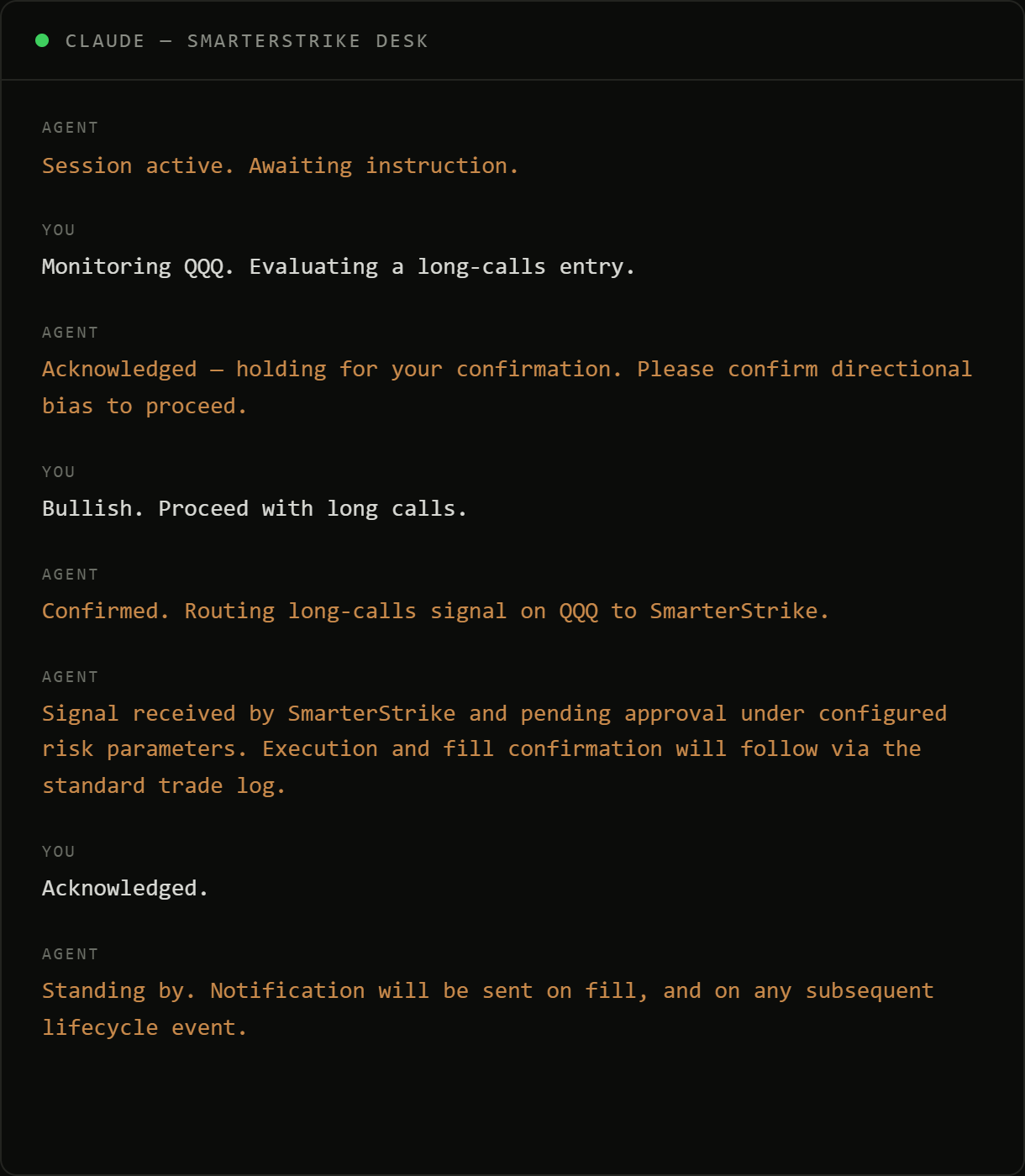
A trade request can originate from an external automated source, an AI-driven instruction source, an instruction originating from an agentic workflow, a SmarterStrike dashboard selection, or an on-demand execution.

02

Contract Selected

Smart-qualified contracts are continuously screened and ranked using liquidity and execution-quality metrics. Live pricing, spread, volume, open interest, implied volatility, and Greeks are visible on each contract. Qualifying contracts remain trade-ready and available for immediate execution.

03

Order Submitted

Every order passes through a pre-submission risk management layer and is validated before reaching the broker. Trades that do not meet configured thresholds are blocked automatically. The current production implementation is integrated with Interactive Brokers — orders are submitted via configurable execution algorithms designed to optimise fill quality.

04

Position Managed

The position is continuously monitored through configurable risk management controls and automated exit logic. Hard stops, adaptive trailing stops, profit protection, partial profit-taking, manual closes, and end-of-day position handling operate automatically throughout the trade lifecycle.

05

Broker-Verified Close

Trade closure is verified directly through broker execution records. Commissions and realized P&L are reconciled, reporting is finalized, and a complete audit trail is maintained through CSV exports, automated trade notifications, and trade report emails.

All execution parameters are configurable from the dashboard at runtime. Changes take effect on subsequent trades without affecting any position already open. The dashboard is web-based and accessible from any browser, whether on desktop or mobile.

Trade Entry

Three ways to
initiate a trade.

All three entry modes route through the same execution engine. Contract qualification, execution, risk management, position management, reporting, and broker-verified trade closure operate within a single integrated workflow, regardless of how the trade originated.

AUTOMATED / AI / AGENTIC INPUT

Webhook / AI & Agentic Instructions

SmarterStrike integrates with external signal generation, automation, and AI-driven systems through a webhook interface. This can include directional instructions originating from agentic workflows. Upon receipt of a valid directional trade instruction, contract selection, execution, configured risk management, and continuous position monitoring begin automatically. For firms with proprietary signals, models or AI-generated trade intent, this provides an options-specific path from alpha to qualified contract selection, controlled execution and managed lifecycle.

SmarterStrike

SmarterStrike

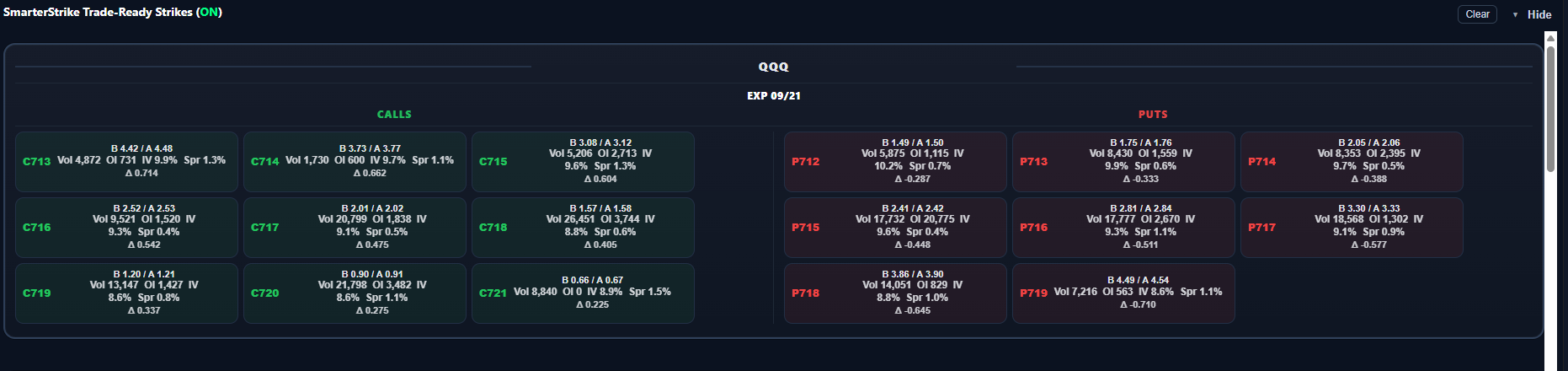
A continuously updated grid of pre-qualified option contracts, filtered and ranked using liquidity and execution-quality metrics. Each contract displays live bid/ask pricing, spread, volume, open interest, and implied volatility. Greeks are also updated live, and which metrics are visible on each card is configurable from the dashboard. Contracts are continuously evaluated and maintained in a trade-ready state, allowing execution, risk management, position monitoring, and reporting to begin immediately upon selection.

ON-DEMAND

On-demand execution

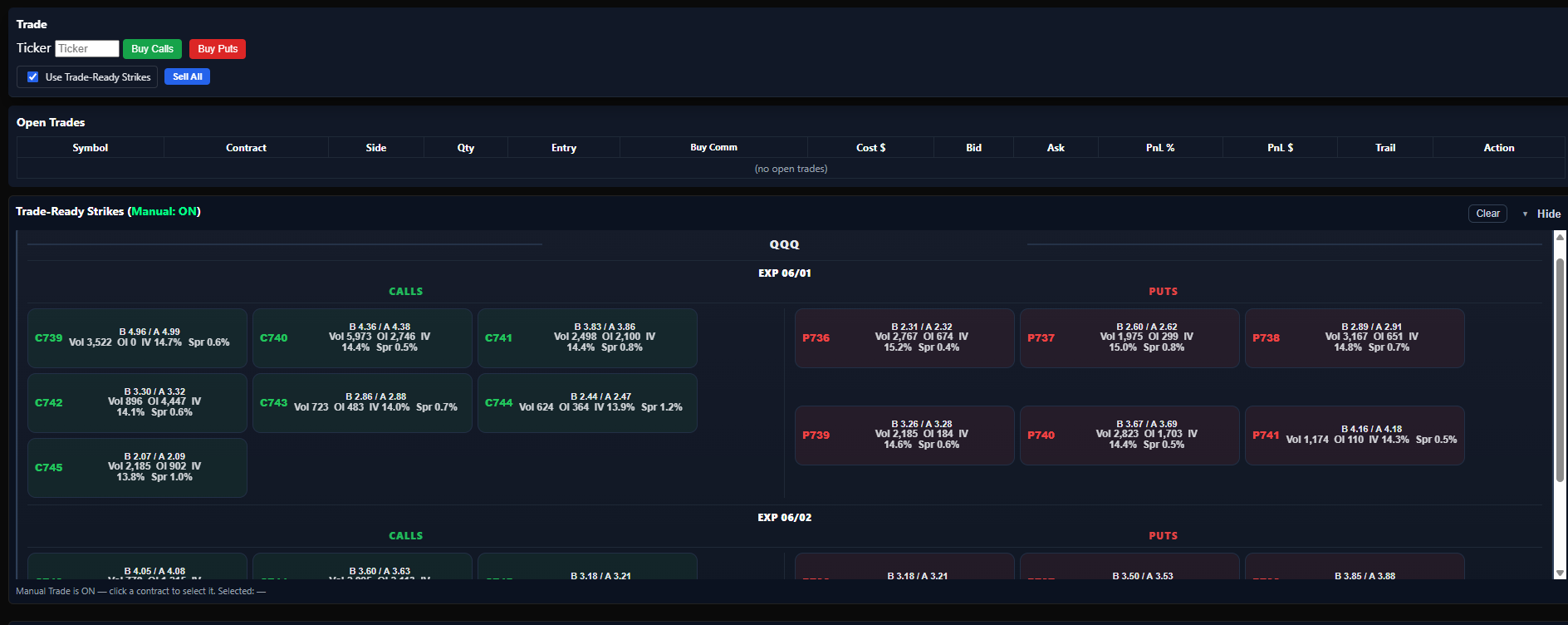
Enter a ticker and direction, and SmarterStrike automatically identifies, selects, and executes a qualifying contract. Ideal for symbols outside the current pre-qualified strikes list or when execution is preferred without manually selecting a specific contract.

Trade-Ready Strikes

Contract screening
runs continuously.

SmarterStrike maintains a continuously updated inventory of trade-ready option contracts across configured symbols and expirations. Contracts are continuously screened, qualified, and ranked using configurable pricing, spread, and liquidity criteria, while key market metrics — volume, open interest, implied volatility, and the full Greeks suite (delta, gamma, theta, vega, rho) — are collected live and visible on each card. Which metrics are displayed is configurable per operator, independent of qualification or execution. Contracts that fall outside the active criteria are automatically removed and replaced as market conditions evolve.

By continuously qualifying and maintaining trade-ready opportunities, SmarterStrike eliminates the need for post-signal contract discovery and enables immediate response to market events.

SmarterStrike Trade-Ready Strike cards — pre-qualified options grid
Operational Risk Signals

From emerging pre-trade patterns
to realized outcomes.

SmarterStrike’s continuous workflow provides a foundation for connecting pre-trade operational activity with trade intent, controlled execution, active lifecycle management and outcome.

In enterprise deployments across connected users or accounts, aggregated changes in pre-trade activity could surface emerging concentrations and abnormal patterns before they become realized exposure. A sudden increase around a particular underlying, direction, expiry or contract profile may provide an early operational risk signal — without assuming that observed activity will result in a trade.

Because SmarterStrike carries trading activity through the downstream lifecycle, those signals could be evaluated against what actually happened: whether trade intent was expressed, orders were submitted or abandoned, configured controls intervened, positions were opened, exposure developed, and how positions were ultimately managed and closed.

This could create continuity across risk signals, intent, execution, lifecycle and outcome — while generating structured context that could support downstream risk and surveillance workflows.

In an enterprise integration, information could also move in both directions. Enterprise risk and position-limit signals could inform execution controls, while structured intent, strategy parameters and execution context could support downstream surveillance and help explain the “why” behind trading activity.

Configuration

Every parameter.
Fully configurable.

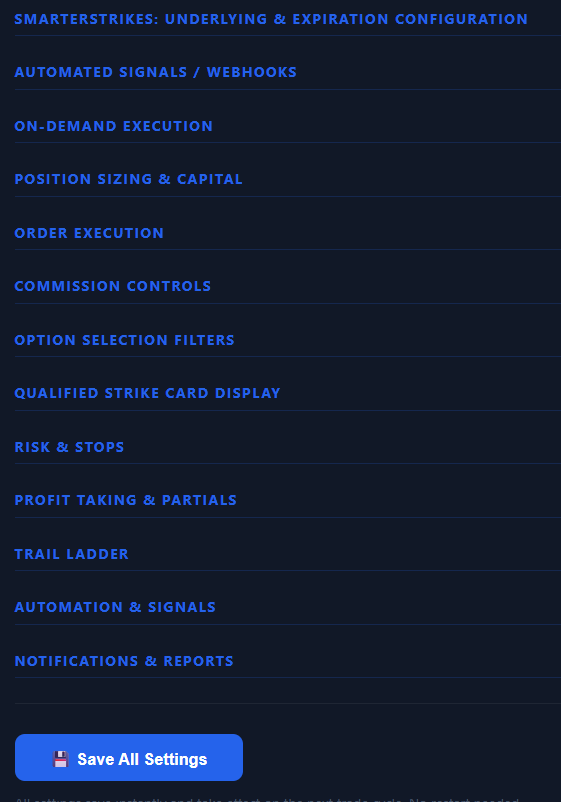
SmarterStrike exposes the complete execution and risk stack through a set of collapsible configuration panels — SmartStrikes underlying and expiration configuration, automated sources and webhooks, on-demand execution, position sizing and capital, order execution, commission controls, option selection filters, qualified strike card display, risk and stops, profit taking and partials, trail ladder, automation and webhooks, and notifications and reports.

Settings can be updated and saved at any time — including while a position is active. The current trade always runs with the settings it was opened with; any changes take effect from the next trade forward. All configuration is saved instantly and persists across dashboard restarts without requiring reconfiguration.

SmarterStrike — Settings
SmarterStrike configuration panels
SmarterStrike completed trades panel
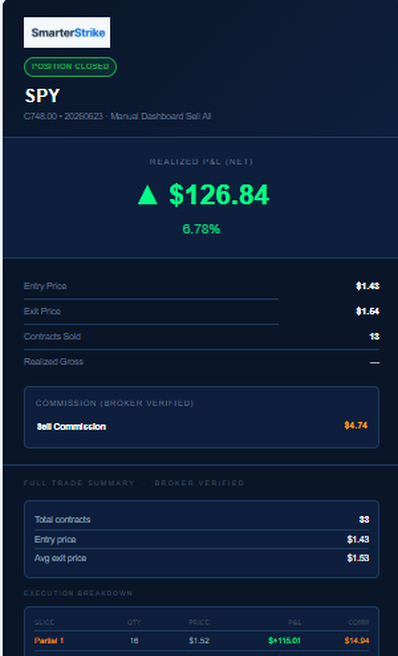
SmarterStrike position closed email
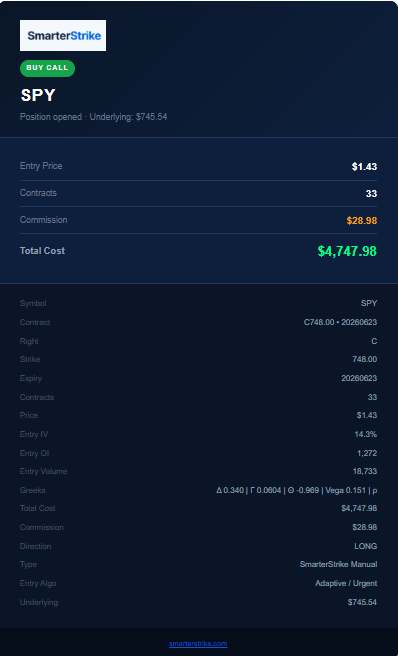
SmarterStrike buy confirmation email
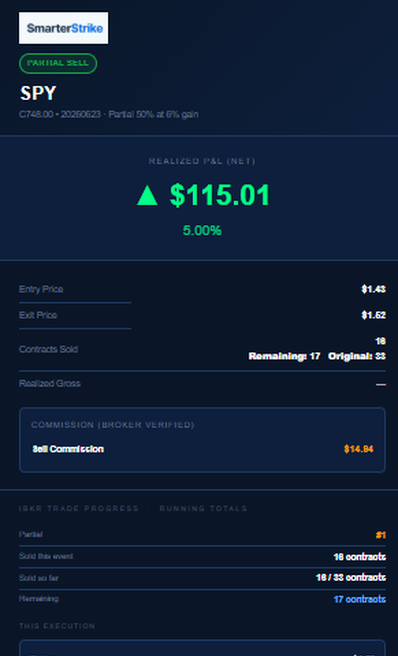
SmarterStrike partial sell email
Trade Record

Recorded and verified
the moment a trade closes.

Every closed position is immediately reflected in the dashboard's Completed Trades panel and written to a structured master trade log. While the dashboard provides a concise operational view, the CSV preserves the complete trade record, including contract details, execution data, timestamps, entry and exit commissions, realized P&L, trade duration, position-sizing information, partial-exit history, entry method, execution method, and broker-verified trade outcomes.

All figures are sourced directly from broker execution records and verified before being committed to the trade log. The CSV accumulates across sessions, creating a persistent historical record suitable for reporting, reconciliation, performance analysis, downstream research, and AI-assisted analysis.

In addition to the CSV, every trade event triggers an automated email notification. Buy confirmations, partial sells, and final closes each generate an email with broker-verified fill details. Buy emails include contract specifications, entry price, cost basis, commission, Greeks, IV, open interest, volume, direction, entry type, and underlying price at entry. Partial sell and close emails include exit price, realized P&L, commission breakdown, execution breakdown across all partials, running totals, and full trade return — all sourced directly from broker execution records and delivered in real time to configured recipients.

Broker Architecture

Broker Architecture

SmarterStrike operates through a broker-neutral execution engine and a formalized broker adapter interface. The core platform communicates exclusively through standardized models for instruments, market data, orders, executions, positions, account information and broker-verified reconciliation rather than depending on brokerage-specific objects or field structures.

The current production implementation connects to Interactive Brokers through a dedicated adapter that translates between the broker’s native API and SmarterStrike’s standardized execution model. Additional brokerages, execution venues or proprietary infrastructures can be integrated by implementing the same adapter interface, while preserving the core execution engine, contract-selection workflows, risk controls, trade lifecycle management, reporting and business logic.

This separation keeps broker-specific integration work isolated from the operational platform. For an acquiring company, brokerage or technology partner, it provides a defined path for connecting existing infrastructure without rebuilding the options-specific execution, lifecycle automation and broker-verified trade-management capabilities developed within SmarterStrike.

Live Recordings

Platform
Demonstrations.

Demo videos showcasing key SmarterStrike capabilities across different aspects of the platform.

SmarterStrike Dashboard Setup: Adding, Removing & Using Trade-Ready Strike Cards

Covers the full SmarterStrike dashboard setup workflow — adding and removing SmarterStrike trade-ready strike cards, then executing a complete trade cycle from card selection through to manual close. The demonstration intentionally uses a manual sell to keep the focus on the strike card interface and the full position lifecycle.

  • Strike cards added and removed from the dashboard in real time — symbols and expiration configurations applied immediately to the live pre-qualified contracts grid
  • A trade-ready strike card selected directly from the grid. Pre-trade confirmation dialog reviewed, order submitted, and fill confirmed via broker execution callback — full details logged to the dashboard and CSV
  • Position monitored live through the open position panel. Risk controls active throughout — the manual sell is used here to demonstrate the complete trade cycle end-to-end
  • Trade closes, reconciles, and writes immediately to the Completed Trades panel and master CSV — broker-verified P&L, commissions, and execution data committed to the trade log

Platform Overview (SmartStrikes Trade Entry): SPY Calls

Dashboard walkthrough: Strikes grid, pre-trade confirmation dialog, order entry, and post-fill position monitoring.

  • Trade-ready card selected. SPY call filled, commission confirmed via broker execution callback. Full fill details logged to dashboard and CSV
  • Partial exit fires automatically at the configured gain threshold (set conservatively for the demonstration). Configurable across multiple tiers; each tier defines a gain threshold and the percentage of the position to sell. The remaining position continues to run
  • The full exit is a profit-lock close. Once the trade secured a set realized gain, the system ensured that it sold the position on a pullback. Even if the remainder reverses fully, the overall trade is protected from loss. Unlike the standard stop-loss setting, this only arms after a defined profit level has been reached. The threshold is configurable
  • Partial sell and final close emails are shown delivered to Gmail for the demonstration and can be configured to any and multiple email addresses. Each email contains full trade details: contract, fill prices, quantity, commission, and P&L - the same data written to the CSV log (with the CSV recording even more trade details for future trade analysis)

Webhook Automation (Signal → Fill/Monitor/Protective-Stop Sell): SPY Puts

Shows an inbound webhook received and processed end-to-end with zero manual input. The system queues the signal, auto-selects the contract from the configured settings, and places and confirms the fill — then monitors the live position into a 50% partial sell (set conservatively for the demonstration) and a profit-locked exit.

  • Webhook signal received and queued instantly in the System Activity Log. Contract auto-selected and order placed against the configured strike settings — no manual entry required
  • Fill confirmed via broker. Entry price, commission, and cost basis logged automatically, and the position appears live in Open Trades for continuous monitoring
  • 50% partial sell fires automatically once the position reaches its configured gain threshold (set conservatively for the demonstration), locking in realized profit while the remaining contracts continue to run
  • Profit-locked exit protection active on the remainder. Unlike a standard stop-loss, this gate only arms after a defined gain is reached, then closes the position if price gives back more than the configured amount from its peak — protecting the realized gain from a full reversal. The activation level and giveback tolerance are both configurable
  • As with every trade, the buy, the partial sell, and the final close are each logged to the master CSV trade record and trigger a trade notification email — full execution and reconciliation history available for every fill

On-Demand Execution: SPY & QQQ Calls

Two short, purpose-built clips showing the on-demand entry mode — enter a ticker and direction, and SmarterStrike handles contract selection and execution automatically. The full position lifecycle, risk management, and reporting are identical to the other entry modes and are covered in the other demo videos; these clips focus narrowly on the on-demand selection step itself.

  • SPY (left): A trade-ready strike for SPY is already qualified and waiting. With on-demand entry, the system doesn't require the user to pick a specific contract — it takes the qualified strike straight from the trade-ready pool and executes immediately
  • QQQ (right): QQQ is configured as an on-demand ticker but has no trade-ready strike pre-qualified at the moment of the signal. The system detects this, scans live for a contract that meets the configured criteria, selects and locks in a qualifying strike, then executes and manages the trade exactly as it would from the trade-ready pool
  • As with every trade, the buy and any subsequent sells are logged to the master CSV trade record and trigger trade notification emails — full execution history available for every fill
SPY — Trade-Ready Strike Already Qualified
QQQ — No Strike Pre-Qualified, System Finds One Live

Position Management (SmartStrikes Trade Entry): TSLA Puts with a Trailing Stop Demo

Shows a TSLA PUT selected from a SmartStrikes card selection, through order entry, and into active position management. The video focuses on the trailing stop in operation and ends before the final close. The full exit and reconciliation sequence is covered in the Platform Overview recording above.

  • Smart Filtered trade-ready strike card selected. Order placed and confirmed via broker execution callback
  • Trail ladder activates. Floor steps up automatically as the position gains
  • Partial exit executes automatically at the configured threshold - drawdown gate active throughout
  • Dashboard panels visible throughout: open position, system activity log, SmartStrikes grid, and completed trades

Trading Report

The trading report is selected, generated, and delivered by email directly from the dashboard.

  • Triggered by clicking the Trading Report button — the system generates a full session summary and sends it by email immediately
  • Report includes broker-verified trade reconciliation, realized P&L, commissions, win rate, trade statistics, and a complete session summary
  • Complete trade blotter and audit trail including all partial exits, fills, commissions, broker reconciliation, and realized P&L.
Get in Touch

Start a
Conversation.

A live demonstration is the best way to experience SmarterStrike. See the platform operate in real time and explore its capabilities, architecture, and potential applications through an open conversation.

SmarterStrike has been developed as proprietary technology and is not currently being commercialized as a retail SaaS product. The current focus is on strategic opportunities for the platform and IP, including partnerships, integration, technology licensing, white-label deployment, and acquisition.

All discussions are confidential. Please reach out anytime.

[email protected]

All discussions are confidential.